 QuickTrack For Schools
A buyer's guide
School library software: what to look for.
Choosing a library system is a big decision for a school. Here is a plain checklist of what matters, and how QuickTrack For Schools answers each point, so you can compare options fairly.
Download a free demoAsk us a question
1. Fast, simple lending
Staff should be able to lend and return in seconds, with a USB scanner or a phone camera. Look for fast-scan modes for queues, class sets so a teacher can borrow a whole box at once, and rules that look after themselves: loan limits, due dates that skip school holidays, fines and reservations.
QuickTrack: scan a card, scan a book, done. Returns are one scan, and class sets, batch adding and stocktake are built in.
2. A student experience children want to use
A library only works if children use it. A good system lets pupils find and choose books themselves, suggests books at the right level, and makes reading feel rewarding without exposing the staff side of the system.
QuickTrack: the student window is a full-screen home screen with books picked for each child, rows such as new books and most popular, search, ratings, streaks and stickers. It locks to a staff code.
3. Data protection you can explain to a governor
Ask where pupil data is stored, whether it is encrypted, who can see it, and what leaves the school. Be wary of systems that need accounts for children or show advertising.
QuickTrack: the library and every backup are encrypted with AES-256 and kept on your own computers. There are no ads, no tracking and no accounts for children, and anything optional, such as inter-school challenges, is opt-in and shares totals only. Read our Privacy Policy.
4. Getting your data in
You should not have to retype your library. Check that the system imports your existing books and syncs pupils and classes from your school information system.
QuickTrack: import from CSV, Excel, OpenDocument, MARC and ISBN lists with a preview and undo, and sync from Wonde, Clever or OneRoster. Covers and details fill in from the ISBN.
5. The devices you already have
Check that it runs on what your school uses, not only one kind of computer, and that scanning works on phones and tablets too.
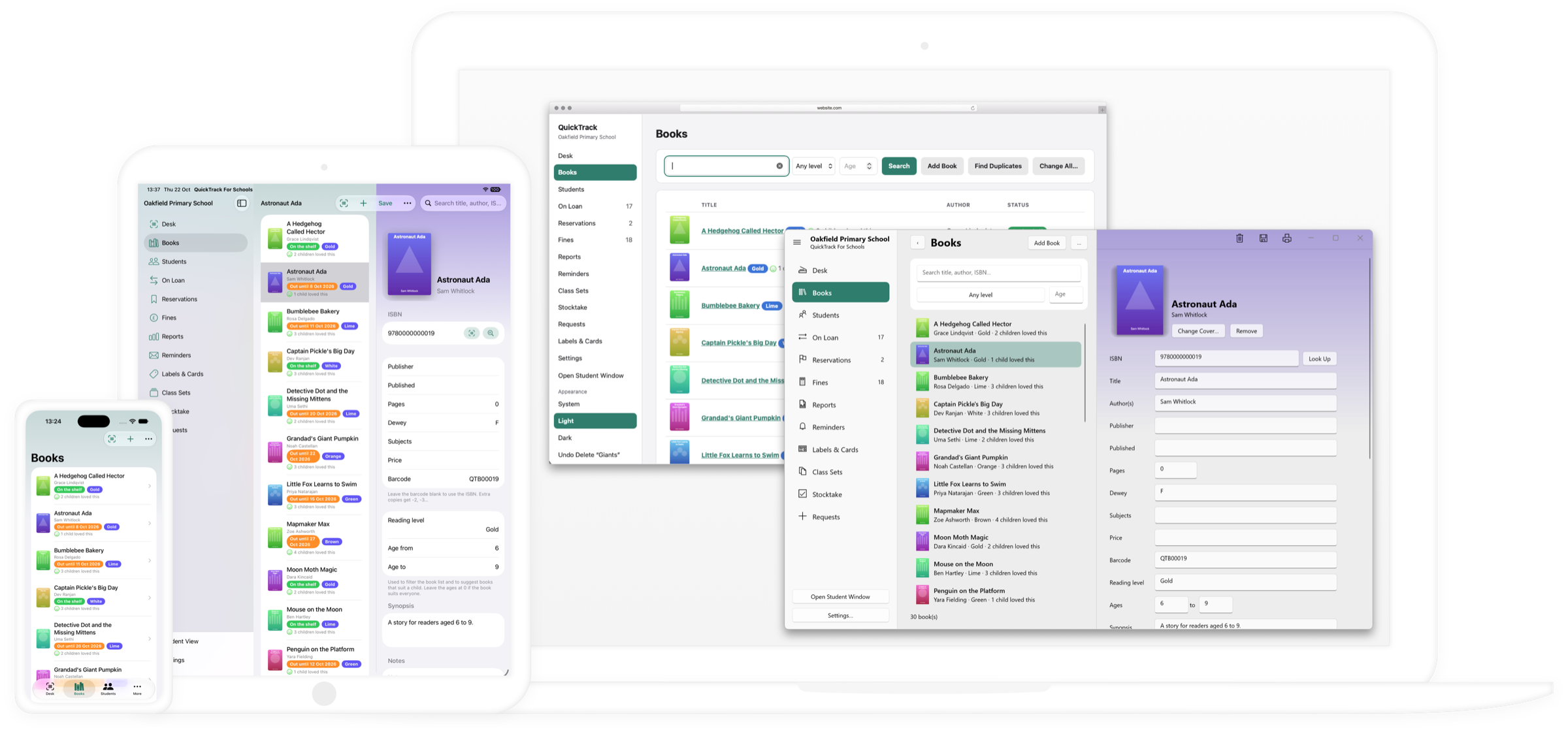
QuickTrack: native apps for Mac and Windows, iPhone and iPad, plus a web version for other devices such as Chromebooks. It is available in ten languages.
6. Reports, reminders and reading progress
You will want to know what is overdue, who owes fines, what is popular and how children are progressing, and to send reminders without writing each one.
QuickTrack: built-in and custom reports, friendly overdue emails with an optional copy to teachers and parents, reading journeys and termly reading summaries for families.
7. Support and a fair price
Find out what help is included and what the real yearly cost is, including extra devices.
QuickTrack: £297.00 per year per library, with additional devices connecting to the main library free of charge. Help comes from the built-in help window, step-by-step guides, remote support sessions and email support.
Up and running in an afternoon.
Try the demo
Download QuickTrack for Mac or Windows. It has every feature, with up to 10 books and 10 students.
Check it against this list
Use your own books and a few pupils to see how each point works for your school.
Order your licence
Ask us for a licence and add it to the app you have already set up.
Questions
What is school library software?
School library software keeps a catalogue of a school's books, records who has borrowed what, manages returns, fines and reservations, and helps staff report on the library. Good systems also help pupils find books they will enjoy.
Do we need to buy extra modules?
No. The basics are included, and extra devices can connect to your main library free of charge.
Can we try it before we buy?
Yes. The free demo has every feature and lets you add up to 10 books and 10 students.
See it with your own books.
The free demo allows you to access all features of the software and add up to 10 books and 10 students.