 QuickTrack For Schools
For primary schools
Library software for primary schools.
QuickTrack is school library software that young readers actually enjoy, and that a busy teacher or librarian can run in minutes a day. Children scan their card, see books picked for them and find their next read. Staff scan, scan, done.
Download a free demoAsk us a question
A library children ask to use
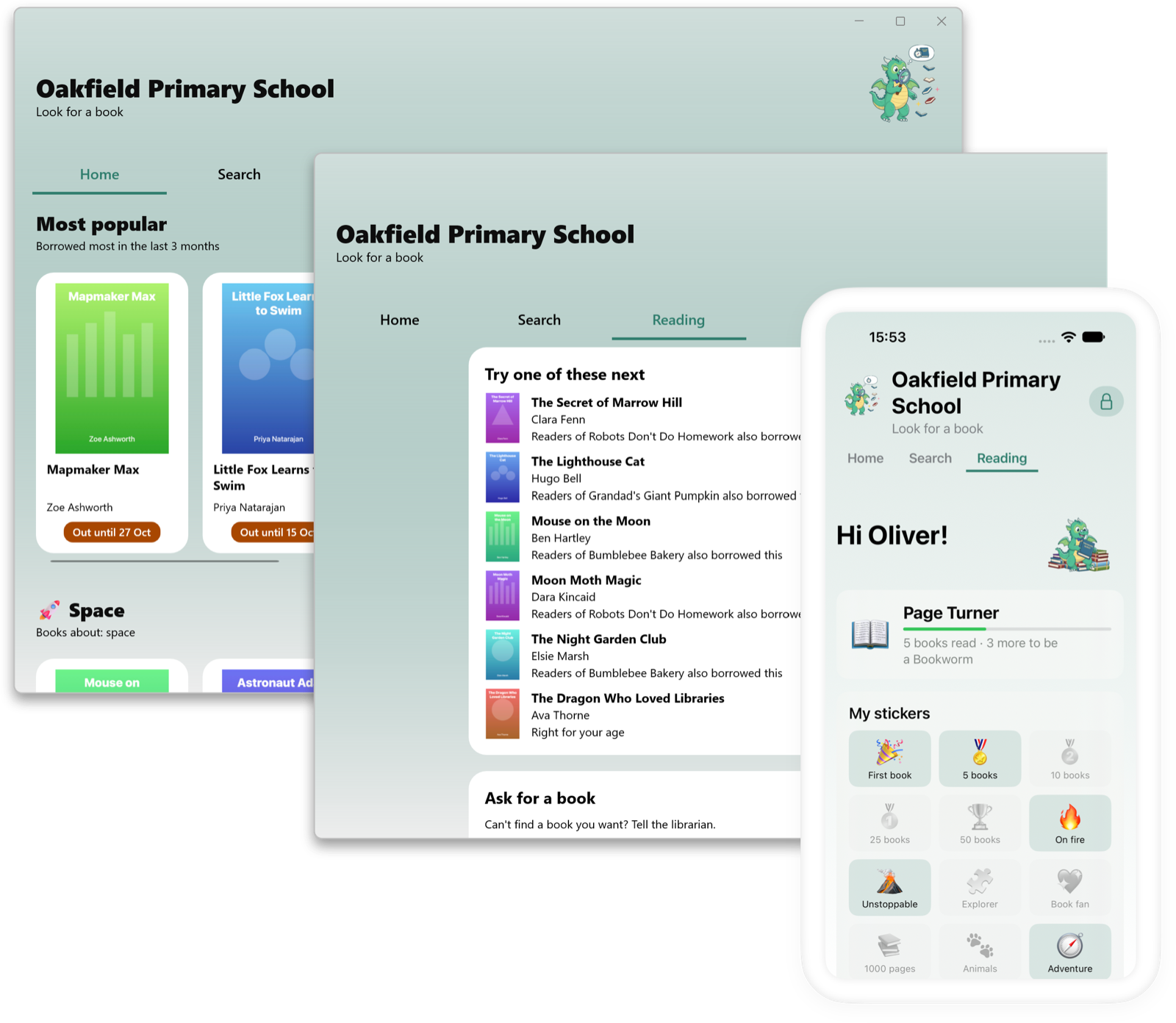
The student window is a full-screen home screen for pupils, designed to feel like a streaming app rather than a database. Pupils meet Iggy, the library dragon, scan their own card and see books picked for them from their reading level, age and what they have borrowed before.
- Rows to explore: new books, most popular, Book of the Week and reading lists your staff curate.
- Reading that feels like a game: streaks, stickers, goals and ratings.
- Search and requests: children can look for a book themselves and ask for one the library does not have.
Quick for busy staff
Lending is two scans: the student's card, then the book. Returns are one scan. Use a USB scanner on the computer, or the camera on an iPhone or iPad.
- Class sets: lend or return a whole box of books to one teacher in a single go.
- Labels and cards: print book labels and student cards with fast previews.
- Fast-scan mode for queues, with sounds and a receipt when you want one.
The right book at the right level
Set a reading level or age for each student. QuickTrack flags books that are not a good fit and staff can still override it, so a keen reader is never stopped from borrowing what they want.
Families and teachers kept in the loop
Overdue reminders are friendly emails to the student, with an optional copy to teachers and parents. Parents can be sent a link to see what their child is reading, and termly reading summaries can go out by email or print.
Safe for children and easy on data protection
Pupils only see the library: no accounts, messaging or ads, and the student screen can be locked so it cannot be closed without a staff code. The library and every backup are encrypted with AES-256, and your data stays on your own computers.
Up and running in an afternoon.
Add your books
Scan ISBNs or import your list. Covers and details fill in for you.
Add your pupils
Import a class list or sync from Wonde, Clever or OneRoster, then print cards.
Start lending
Switch on the student window and let the reading begin.
Questions
Is it suitable for younger children?
Yes. The student window uses large covers, simple rows and a friendly dragon, and children only ever see the library, with no accounts, messaging or ads.
How do pupils borrow a book?
Pupils scan their card at the desk and the librarian or teacher scans the book, or a class set can be lent to a teacher in one go. The student window is for finding books and tracking reading.
Can we try it with our own books?
Yes. The free demo allows you to use all features and add up to 10 books and 10 students.
See it with your own books.
The free demo allows you to access all features of the software and add up to 10 books and 10 students.